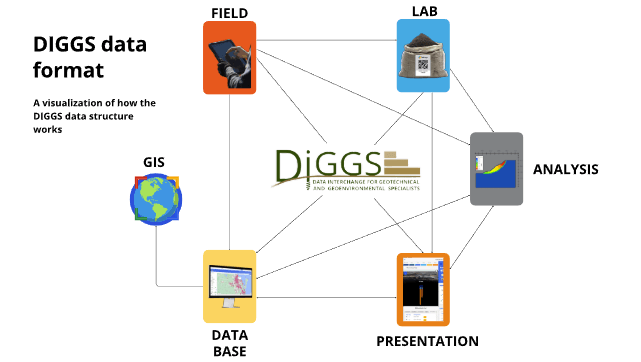
DIGGS and AGS are the two dominant data exchange standards in geotechnical and geoenvironmental engineering. AGS uses a flat file format (CSV or Excel) that is simple to implement and widely supported. DIGGS uses XML, which supports hierarchical data structures suited to complex, multi-source investigations. The right choice depends on project scale, software requirements, and whether your data needs to be exchanged across disciplines or regions.
What is the AGS data format?
AGS (Association of Geotechnical and Geoenvironmental Specialists) is a flat file data format typically delivered as a CSV or text file structured according to the AGS4 standard. Each row represents a record, and data is organised into defined groups such as HOLE, SAMP, ISPT, and MOND. AGS4 is the current version and is the standard expected by most UK clients, regulators, and ground investigation contracts. AGS is widely used across the UK, Australia, and New Zealand, and is supported natively by most geotechnical software including gINT, KeyLABS, and TabLogs.
What is the DIGGS data format?
DIGGS (Data Interchange for Geotechnical and Geoenvironmental Specialists) is an XML-based data standard developed to support interoperability across geotechnical, geoenvironmental, and geologic disciplines. Its hierarchical structure allows nested data — a single borehole record can contain soil layers, test results, groundwater observations, and sample data within one document. DIGGS is more commonly used in the United States, particularly on federally funded infrastructure projects where DIGGS compliance is increasingly specified by agencies such as FHWA.
DIGGS vs AGS: key differences
| AGS | DIGGS | |
|---|---|---|
| File format | CSV / flat text | XML |
| Data structure | Flat, row-based | Hierarchical, nested |
| Primary regions | UK, Australia, New Zealand | United States |
| Complexity | Simple to implement | More complex, requires parsing |
| Software support | Broad, most geotech tools | Growing, especially US platforms |
| Best for | Routine investigations, standard reporting | Complex, multi-discipline, federally specified projects |
When to use DIGGS
DIGGS is the right choice when your project involves multiple data sources that need to be integrated — geotechnical, environmental, hydrological, and structural — or when a US federal or state agency specifies DIGGS compliance. It is also the better option when your organisation is building a long-term data repository that needs to support complex querying, filtering, and cross-project analysis.
Typical use cases include highway and railway geotechnical investigations, FHWA-funded projects, large-scale urban development programs, and organisations building centralised geotechnical data platforms.
When to use AGS
AGS is the right choice when your project is in a market where AGS4 is the contractual standard, when your team is working with common geotechnical software that exports AGS natively, or when data needs to be submitted to a client or regulator who specifies AGS format.
Typical use cases include residential and commercial foundation investigations, environmental site assessments, ground investigation contracts in the UK and Australia, and any project where the deliverable is a standard AGS4 data file alongside the factual report.
Can you convert between AGS and DIGGS?
Conversion between AGS and DIGGS is possible but not straightforward. The structural difference between a flat file and a hierarchical XML format means direct field mapping works for most standard data types but can lose nuance in complex records. Some geotechnical software platforms support export to both formats. If your project requires both, the cleanest approach is to capture data in a structured database from the start and generate AGS or DIGGS output at the export stage rather than converting between the two after the fact.
Which formats does TabLogs support?
TabLogs supports export to both AGS4 and DIGGS directly from the platform. Data captured in the field or office is stored in a structured format and can be exported to either standard without manual reformatting. This means teams working across UK, Australian, and US markets can use a single platform and deliver to local format requirements at the reporting stage.