TabLogs and OpenGround are both geotechnical data management platforms, but they serve different firm profiles. OpenGround is an enterprise database system suited to large organisations with internal IT infrastructure. TabLogs is a cloud-native platform built for field-first logging, automated reporting, and teams that want structured data management without administrative overhead. This comparison covers deployment, field usability, reporting, cost, and migration considerations.
Choosing the right borehole logging and geotechnical data platform can dramatically impact project efficiency, reporting quality, and collaboration across teams. OpenGround has been a strong enterprise option for large organizations, but many firms are now evaluating modern, cloud-centric alternatives like TabLogs. Firms searching for an OpenGround alternative are typically evaluating modern borehole log software that reduces IT overhead while improving field usability.
This comparison explains the core differences between TabLogs and OpenGround so you can make an informed decision for your geotechnical workflows.
What Is OpenGround Geotechnical Software?
OpenGround is a geotechnical data management system widely used in engineering firms that require enterprise scale and database-driven workflows. It provides structured logging, visualization, reporting, and database integration.
OpenGround is designed to centralize subsurface investigation data and enable multi-project access, often integrated with corporate data environments.
What Is TabLogs Borehole Log Software?
TabLogs is a cloud-native, field-ready borehole logging and geotechnical data platform designed specifically for geotechnical engineers and firms of all sizes. TabLogs focuses on:
- Field and desktop logging
- Automated report generation
- Structured, reusable subsurface data
- GIS integration and spatial context
- Cross-project data management
TabLogs was built to address modern geotechnical challenges including real time collaboration, flexible templates, and integrated workflows from field to report.
TabLogs vs OpenGround: Feature Comparison for Geotechnical Engineers
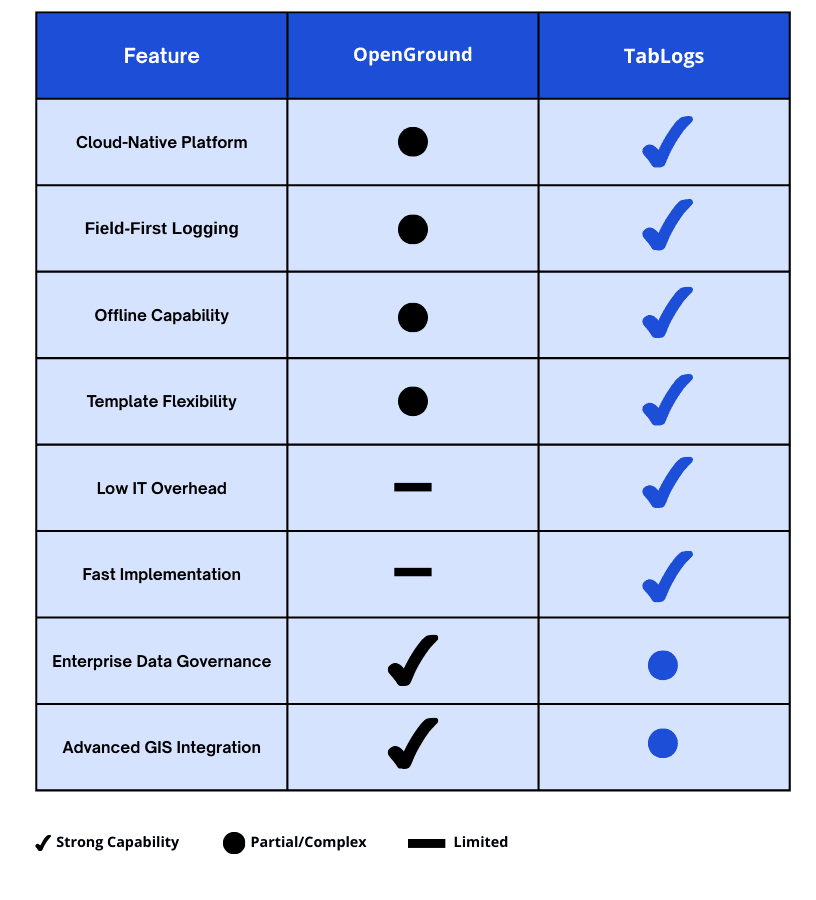
Deployment and Cloud Accessibility
OpenGround
OpenGround often requires enterprise hosting, database administration, and internal IT management. Many firms use it behind secure networks with controlled access.
Access from the field typically requires additional setup or proprietary interfaces, which can limit flexibility for remote teams.
TabLogs
TabLogs is cloud native and accessible from:
- Desktop application
- Browser on any device
- Mobile devices with offline support
This means field engineers can log data without relying on internal VPNs or complex IT configurations.
Field Borehole Logging Capabilities
OpenGround
OpenGround has structured logging capabilities but often requires configuration and support to enable field devices effectively. Offline or remote logging usually depends on third party apps or pre configured workflows.
TabLogs
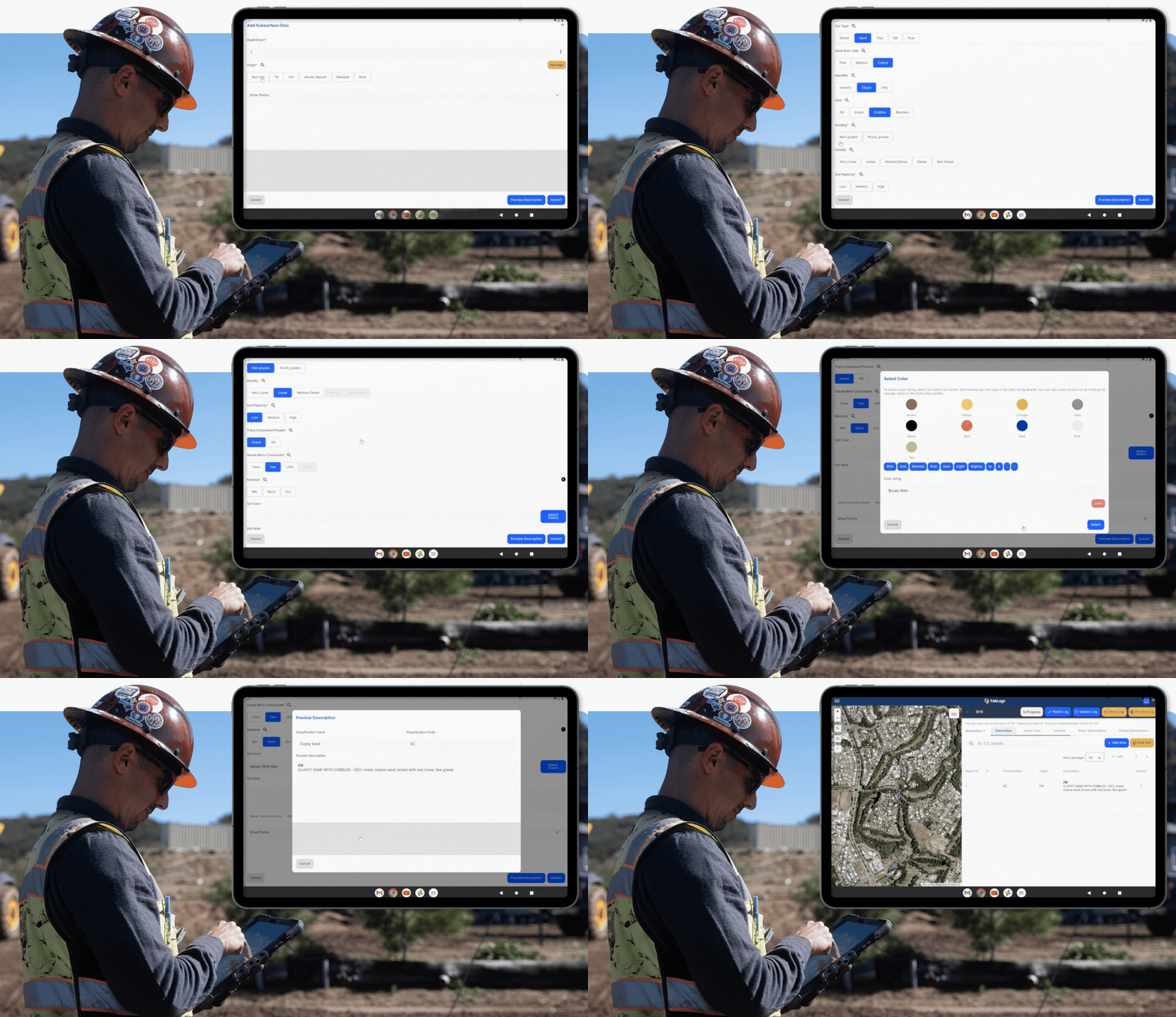
TabLogs prioritizes fast, reliable field logging that:
- Works online and offline
- Syncs when connected
- Reduces manual transcription
- Includes classification standards
This field focus significantly reduces errors and accelerates reporting timelines.
Automated Borehole Log Report Generation
OpenGround
OpenGround provides report templates and formats that are powerful but often require specialist skills to customize, especially for firm branding or internal standards.
TabLogs
TabLogs includes automated report generation that:
- Produces professional borehole logs
- Follows firm specific layouts
- Integrates field, lab, and narrative data
- Outputs to PDF ready for clients
Templates are easy to edit and deploy without specialist consultants.
GIS Mapping and Spatial Context
OpenGround
GIS capabilities are strong and integrated into corporate environments. However, spatial workflows can require dedicated support and may be tied to enterprise GIS deployments.
TabLogs
TabLogs provides:
- Interactive project maps
- Borehole placement and site plan overlays
- Coordinate based logging
- Easy access for field and office users
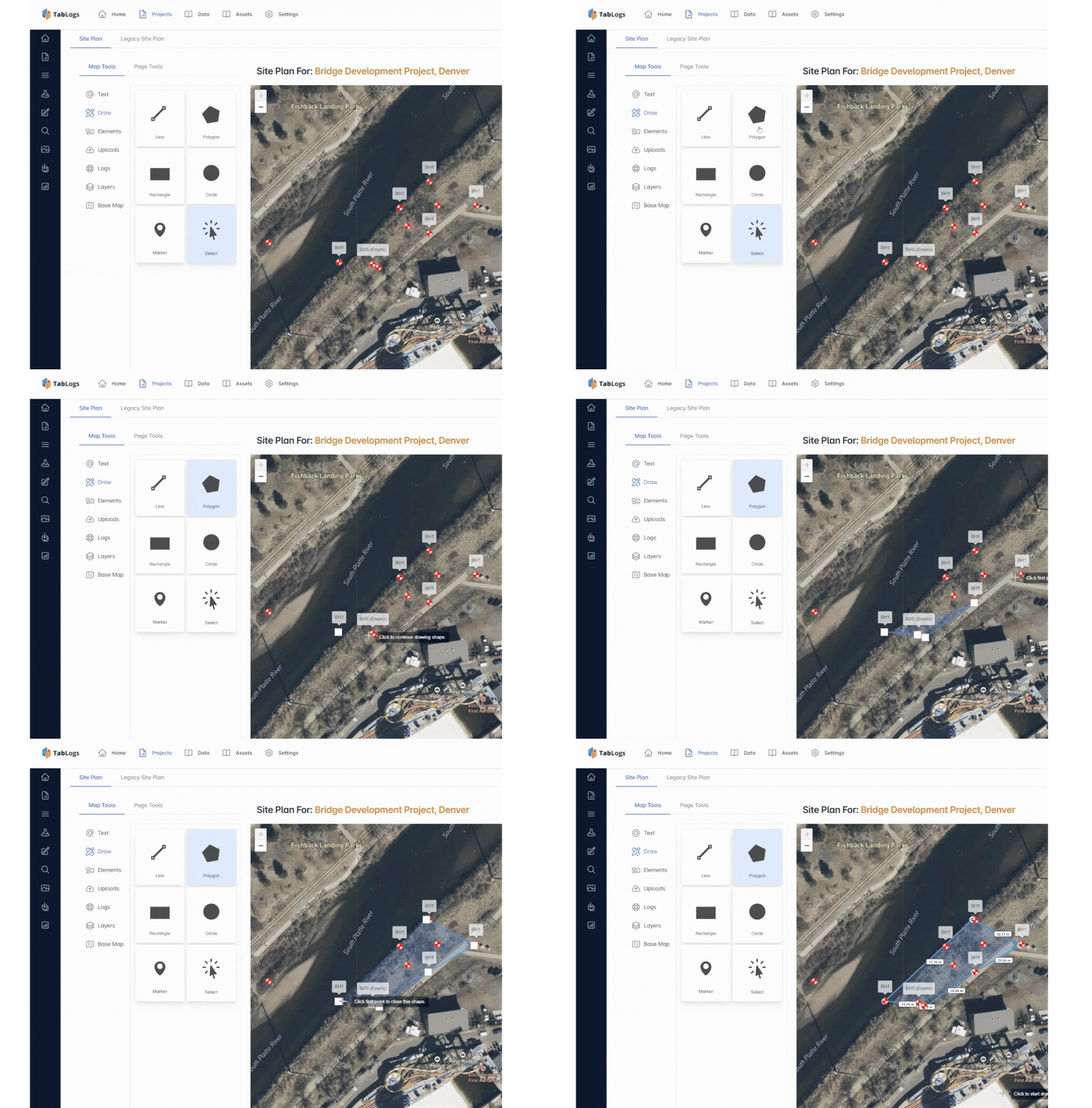
This makes it easier for project teams to visualize subsurface data in spatial context.
Scale and Collaboration
OpenGround
Designed for enterprise environments, OpenGround supports large centralized teams and integrated corporate data systems. Collaboration works well but often depends on internal database administration and governance.
TabLogs
TabLogs supports:
- Real time collaboration
- Cross project data queries
- Centralized data accessible by project teams
- Structured reuse and QA workflows
All without complex backend administration.
Template Flexibility and Customization
OpenGround
Template customization in OpenGround can require specialist setup and administrative overhead. Changing report formats or logging standards often involves database configuration.
TabLogs
TabLogs provides flexible templates that can be customized without heavy IT involvement. Engineers and administrators can:
- Tailor log layouts
- Configure column structures
- Save firm specific standards
- Deploy changes quickly
This makes maintaining consistent reporting easier.
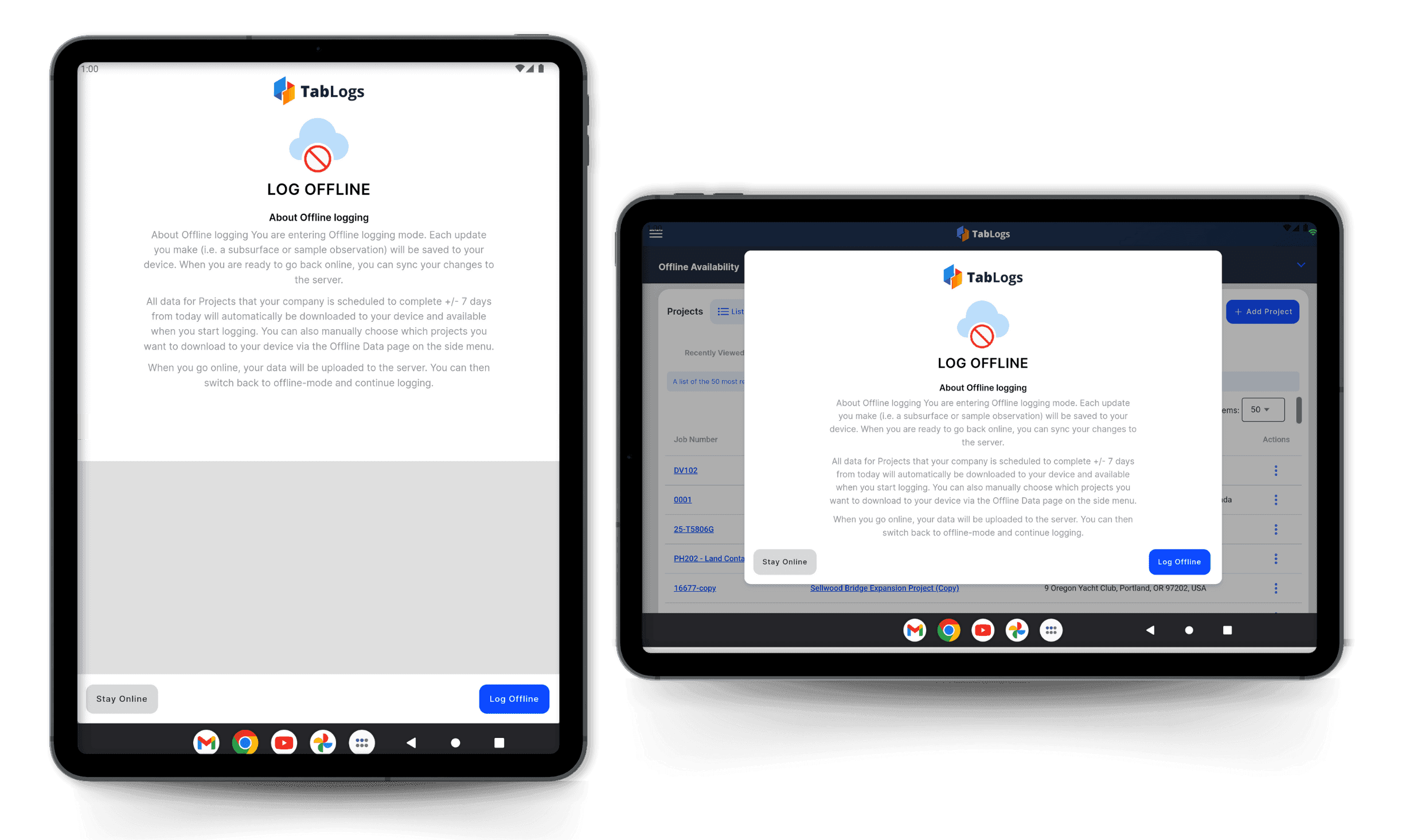
Offline Field Logging
OpenGround
Offline functionality depends on additional systems or integrations. Native mobile use cases may not always be fully supported.
TabLogs
TabLogs is built with offline field logging in mind. Field engineers can log data even without connectivity and sync when online.
This is particularly useful for remote sites, deep boreholes, and constrained environments.
Structured Data Management
Both platforms store structured geotechnical data. However:
OpenGround
Data is stored in an enterprise database that often requires internal governance.
TabLogs
Data is structured and reusable with less administrative overhead. This allows faster cross project reporting, queries, and analysis.
API and Integrations
OpenGround
Integrates with enterprise systems and GIS solutions. Configuration may require dedicated support.
TabLogs
TabLogs provides modern API connectivity and integrations that support:
- Laboratory systems
- Corporate data systems
- GIS workflows
- Automated external tools
This makes TabLogs a flexible choice for firms that want to integrate with emerging technology without enterprise complexity.
Vendor Ecosystem Flexibility
Large engineering consultancies rarely operate within a single software ecosystem. Many use Rocscience products for geotechnical analysis, Bentley tools for drafting and digital engineering, and separate platforms for environmental data management.
OpenGround is part of the Bentley product suite, which can align well for organizations standardizing on a single vendor stack.
TabLogs is designed to sit independently at the logging and structured database layer. This allows firms to utilize best-in-class analysis and drafting tools across multiple vendors without being tied to one ecosystem.
Rather than replacing analysis or drafting platforms, TabLogs integrates with them. This gives organizations flexibility in long-term software strategy while maintaining a centralized, structured borehole database.
For firms that operate across mixed technology environments, this vendor-neutral approach reduces lock-in risk and supports cross-departmental workflows.
Why Firms Are Looking for an OpenGround Alternative?
OpenGround remains a well known geotechnical data management system, particularly in enterprise environments. However, many firms are actively evaluating OpenGround alternatives as project demands, field expectations, and internal cost pressures evolve.
1. System Complexity
OpenGround is a powerful database-driven platform. That strength can also introduce operational complexity.
Firms often report:
- Extensive configuration requirements
- Administrative setup before field teams can begin logging
- Dependence on database governance structures
- Specialized training for template management
For organizations with dedicated database administrators, this may be manageable. For smaller or mid-sized geotechnical firms, it can slow down adoption and increase reliance on internal specialists.
Many teams now prefer borehole log software that delivers structured data management without requiring deep database expertise.
2. Cost Structure and Licensing
Enterprise systems frequently come with layered pricing models, including:
- Per-user licensing
- Hosting or infrastructure costs
- Implementation services
- Ongoing support agreements
While OpenGround provides enterprise-level capabilities, firms evaluating alternatives often seek:
- Transparent per-user pricing
- Lower infrastructure overhead
- Reduced reliance on external consultants
- Predictable long-term costs
As margins tighten and projects move faster, cost efficiency becomes a larger factor in software decisions.
3. IT Overhead and Maintenance
OpenGround environments often require:
- Internal IT coordination
- Database maintenance
- Controlled access management
- Governance policies for data structure
For large organizations, this aligns with existing IT frameworks. For growing consultancies, it can create friction between engineering teams and IT departments.
Many firms looking for an OpenGround alternative want:
- Cloud-native deployment
- Minimal internal server management
- Reduced configuration cycles
- Faster rollout across offices
Lower IT overhead allows engineering teams to focus on project delivery rather than system administration.
4. Field Usability Gaps
Modern geotechnical investigations demand seamless field-to-office workflows. Engineers increasingly expect:
- Offline logging capability
- Real-time synchronization
- Mobile accessibility
- Intuitive borehole logging interfaces
When field usability requires additional setup, third-party integrations, or complex workflows, teams often begin evaluating alternatives built specifically for field-first logging.
The trend across the industry is clear: borehole log software must perform equally well on site and in the office.
5. Implementation Time
Enterprise deployments can take significant time due to:
- Template configuration
- Database schema setup
- Governance approval cycles
- Training and onboarding
For firms that need rapid deployment across multiple projects or offices, long implementation timelines can delay return on investment.
Many geotechnical firms searching for an OpenGround alternative prioritize:
- Faster onboarding
- Quick template setup
- Minimal dependency on consultants
- Immediate field usability
In a competitive market where reporting speed impacts profitability, shorter implementation time is a decisive advantage.
The Broader Industry Shift
The growing demand for an OpenGround alternative reflects a broader transition in geotechnical software:
- From database-heavy systems to cloud-native platforms
- From administrator-driven configuration to engineer-driven usability
- From complex deployment to fast implementation
- From desktop-first workflows to field-first logging
As expectations evolve, firms are reassessing whether their current system aligns with how modern geotechnical teams operate.
If your organization is weighing complexity, cost, IT overhead, field usability, or implementation speed, it may be time to evaluate whether a more streamlined borehole log software platform better fits your workflow.
When OpenGround Might Be the Right Choice
OpenGround is a mature system suited to:
- Large organizations with internal IT support
- Firms with existing enterprise GIS environments
- Teams that require structured corporate data governance
For firms with heavy internal data architecture and long established workflows, OpenGround can be a fit.
When TabLogs Is the Better Fit
TabLogs is particularly well suited to firms that want:
- Cloud access without enterprise overhead
- Field first logging with offline capability
- Fast, automated report generation
- Spatial visualization accessible to field and office
- Easy template customization
- Modern API and workflow integrations
- Centralized structured data without complex administration
- A vendor-neutral logging and database layer that integrates across Rocscience, Bentley, and other engineering ecosystems
Firms evaluating total cost of ownership can review the TabLogs pricing structure.
TabLogs scales from small consultancies to multi office organizations with minimal IT requirements.
Migrating from OpenGround to TabLogs
For firms actively researching how to move from OpenGround, the most common questions are practical:
- How difficult is migration?
- What happens to our templates?
- Can we bring historical data across?
- How long will it take?
- What support is available?
Below is an overview of how switching from OpenGround to TabLogs typically works.
Template Recreation
OpenGround environments often rely on customized report templates and structured logging formats that have evolved over time.
When migrating to TabLogs, the first step is recreating your borehole log templates to match:
- Firm branding
- Regulatory requirements
- Client-specific formats
- Column layouts and depth scales
- Soil and rock classification standards
TabLogs supports structured template configuration without requiring database administrators. Most firms are able to replicate their existing layouts while also simplifying and modernizing them.
This ensures continuity in report appearance while improving workflow efficiency.
Data Import
A key concern when switching from OpenGround is preserving historical geotechnical data.
Migration typically includes:
- Importing borehole data exports
- Mapping structured fields into TabLogs
- Preserving depth intervals and classifications
- Validating sample and lab references
- Maintaining project metadata
The goal is not just transferring documents, but converting legacy data into structured, reusable assets inside the new system.
This allows firms to retain project history while gaining improved searchability and cross-project analysis.
Training and Onboarding
OpenGround deployments often involve structured training due to database complexity. When switching to TabLogs, onboarding is focused on practical workflow adoption.
Training typically covers:
- Field logging workflows
- Template configuration
- Report generation
- Cross-project queries
- Administrative controls
Because TabLogs is designed with a geotechnical-first interface, most engineers adapt quickly, reducing the learning curve compared to traditional database-driven systems.
Implementation Timeline
One of the primary drivers for firms seeking an OpenGround alternative is implementation speed.
Enterprise deployments can take months due to:
- Configuration cycles
- Governance approvals
- Infrastructure setup
By contrast, migrating to TabLogs typically involves:
- Template setup
- Initial data import
- Team training
- Live project rollout
Many firms are able to begin logging new projects within weeks rather than months, accelerating return on investment.
Ongoing Support
Switching geotechnical data management systems is a significant operational decision. Ongoing support is critical.
TabLogs provides:
- Guided onboarding
- Template configuration assistance
- Migration planning support
- Ongoing product updates
- Direct communication with the product team
Rather than relying on tiered enterprise ticketing structures, firms receive practical support aligned with day-to-day geotechnical workflows.
Making the Move from OpenGround
For firms considering an OpenGround migration, the process is typically less disruptive than expected when structured properly.
The focus is on:
- Preserving institutional knowledge
- Maintaining reporting standards
- Reducing IT overhead
- Improving field usability
- Accelerating reporting timelines
If your organization is evaluating how to switch from OpenGround to a more field-ready borehole log software platform, a structured migration plan can make the transition efficient and predictable.
Frequently Asked Questions
Is OpenGround still widely used?
Yes. OpenGround remains in use across many large geotechnical and engineering firms, especially where enterprise scale and internal database governance are priorities.
Why are firms evaluating alternatives like TabLogs?
Firms are looking for solutions that reduce complexity, improve field usability, and accelerate reporting without heavy IT support.
Can TabLogs replace OpenGround for large firms?
Yes. Many large organizations evaluate TabLogs because it provides structured data management, collaboration, and reporting with less administrative overhead and better field access.
What type of support and onboarding does TabLogs provide?
TabLogs offers structured onboarding, template setup support, and ongoing product guidance to ensure teams can transition smoothly and adopt best practices.
Conclusion
OpenGround and TabLogs are both capable platforms for managing borehole and geotechnical data. The right choice depends on your firm’s:
- IT support capacity
- Need for field accessibility
- Reporting flexibility
- Integration strategy
- Scale and collaboration requirements
If you are evaluating OpenGround alternatives and want a field-first borehole log software platform built specifically for geotechnical engineers, book a demo with TabLogs today.